

Wondering how to increase followers on Pinterest without relying on luck or guesswork? A few simple changes to your profile and content can make a real difference.
Pinterest rewards patience and consistency more than viral moments, so getting the basics right early matters more than most people expect.
Scroll down to read about the mindset shifts and practical tactics that grow reach and profile strength.
Also know how to check whether a strategy is really working and the common mistakes to avoid. By the end, you’ll have a clear, step-by-step path to steady, real follower growth.
What to Understand Before You Start Growing
Growing your Pinterest following starts less with what you do and more with how you think about the platform itself. Check these few mindset shifts that make everything below work better.
- Search-Driven Discovery: Unlike Instagram or TikTok, where a feed algorithm surfaces you to strangers, Pinterest followers mostly arrive through search intent, so growth feels slower and steadier rather than viral.
- Non-Linear Growth Curve: Pinterest indexes and resurfaces content over weeks or months, so a Pin published today might not gain traction until much later.
- Patience Over Quick Judgment: Don’t judge a tactic’s success within days. Give any single change at least two to three weeks before deciding whether it’s working.
- Followers as a Proxy Metric: For accounts that drive traffic to a website or shop, outbound clicks and saves often matter more than the raw follower count.
- Clarity on Your Real Goal: Before optimizing purely for followers, decide whether follower growth is the metric that matters most or whether it is something else, such as traffic or sales.
These mindset shifts help set realistic expectations and keep your Pinterest efforts focused on the metrics that actually support your goals.
How to Increase Followers on Pinterest
A clear profile, consistent posting, and content that matches what users are searching for can help attract the right audience.
To increase followers on Pinterest, focus on the following strategies that improve visibility, encourage engagement, and turn profile visitors into long-term followers.
1. Switch to a Business Account First

Everything else on this list depends on data you can’t access with a personal account. A Pinterest Business account unlocks Analytics, Rich Pins, and Trends, so without it, you’re optimizing blind.
Do this before touching your content strategy. It takes two minutes to convert an existing account, and you keep all your boards and followers in the switch, so there’s no reason to delay it.
Tip: Convert first, then wait 48 hours before making any content changes. This gives Analytics enough baseline data to actually show you a “before” snapshot to compare against later.
2. Pick One Niche and Audit Your Old Boards for It

Most guides tell you to “pick a niche” but skip the audit step. Go through your existing boards and archive or merge anything off-topic.
Pinterest’s algorithm periodically re-evaluates your account’s focus, and old, scattered boards can drag down relevance scores even months later.
A tight, recent niche signal outweighs total board count every time you’re re-indexed.
Tip: Rename or archive boards you haven’t pinned to in six months instead of deleting them. Archiving hides them from your active profile without losing the saved content or SEO history.
3. Mine “People Also Search”

Everyone says, “Use Pinterest’s search bar for keywords.” Fewer mention scrolling to the bottom of a search results page, where Pinterest lists related searches real users typed.
These phrases are often longer and more specific than autocomplete suggestions, and they reveal exactly how people phrase intent, which is gold for pin titles and board names.
Tip: Run the same seed keyword through both the search bar and the bottom-of-page related searches, then combine the unique terms from each into a single board description.
4. Design for the “Zoomed-Out Grid” View, Not Just the Full Pin

Most tips cover vertical format and text overlays, but ignore that Pins are often seen shrunk down in a crowded grid before a click.
Test your design at thumbnail size: if the text overlay or focal point disappears when shrunk, it won’t stop a scroll. Use bold, high-contrast focal points that remain legible when zoomed out.
Tip: Shrink your finished design to 150 pixels wide on your phone screen before publishing. If you can’t read the headline at that size, increase the font weight or size until you can.
5. Batch Idea Pins Around One Question, Not One Product

Most advice treats Idea Pins as mini-ads. Instead, structure each one around a single reader question, like “what ratio for candle wax to fragrance oil,” answered across 3 to 5 swipeable slides.
This format keeps Pinterest’s session-time signal higher than that of product-first Idea Pins, and it positions your profile as a reference people return to and follow.
Hack: Pull your five most-asked customer questions from DMs, comments, or email and turn each into a separate Idea Pin series.
6. Enable Rich Pins, Then Check They’re Actually Validating

Almost every guide says “enable Rich Pins.” Few mention that the setup often fails silently because expired meta tags or blocked crawlers can make your Pins look static without you knowing.
Use Pinterest’s Rich Pin validator monthly, not just once at setup, especially after a website redesign or CMS migration.
Tip: Set a recurring monthly calendar reminder to re-run the validator. Rich Pin failures rarely trigger any notification, so the only way you catch them is by checking on a schedule.
7. Fix Your Board Organization Before You Post More
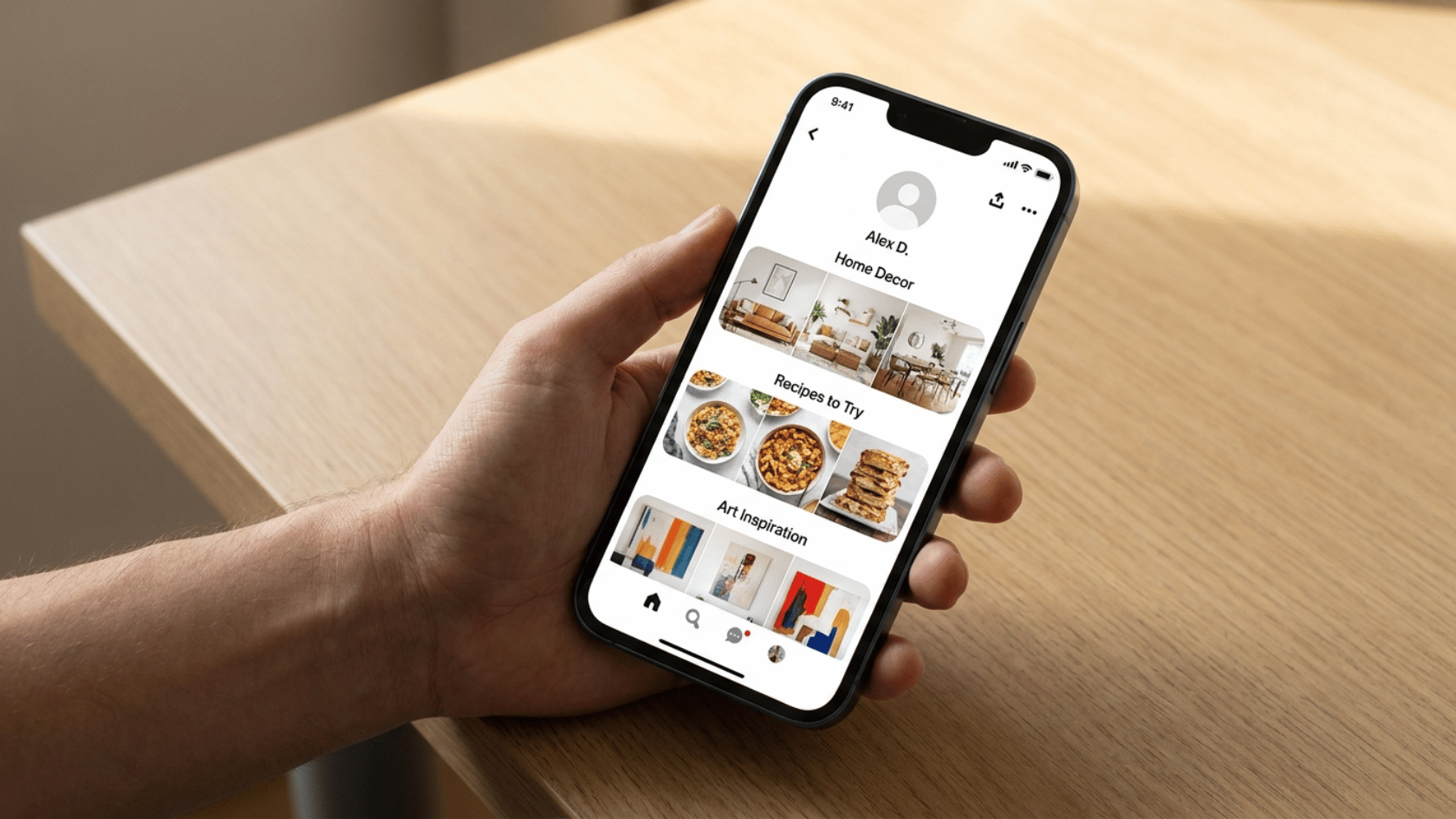
This is the step most growth advice buries or skips: a visitor who clicks through from a great Pin still won’t follow a messy, unsectioned profile.
Before creating new content, organize existing boards into clear sections with keyword-rich names.
A well-organized profile converts profile visits into follows at a noticeably higher rate than raw Pin volume ever will.
Tip: Open your own profile in an incognito window and time how long it takes you to understand your account. If it takes more than five seconds, a new visitor will bounce before following.
8. Post at Data-Backed Times, But Test Your Own Audience Too

General benchmarks, like 4 to 9 pm local time, are a starting point, not the gospel, since your niche and audience time zone can shift this significantly.
Post at recommended windows for two weeks, then check Analytics for your account’s actual saves and click spikes.
Treat published “best times” lists as a hypothesis to verify, not a rule to follow blindly.
Tip: Log your top three performing post times in a simple spreadsheet every week. Patterns usually emerge by week three that are specific to your audience, not the generic benchmark.
9. Use Scheduling Tools to Stay Consistent

Tools like Tailwind or SocialPilot let you queue Pins in advance, so your posting stays steady even on busy weeks.
Most offer built-in calendars, bulk upload options, and suggested time slots based on past performance, removing the guesswork of manually posting each day.
These tools also make it easier to plan campaigns or seasonal content in advance, rather than scrambling day by day.
Tip: Set aside one hour weekly to batch-schedule Pins for the week ahead using one of these tools, then spend the rest of your time on content creation instead of manual posting.
10. Understand That Engagement Drives Profile Visits, Not Follows Directly

This is the missing link most guides never spell out: a save or comment doesn’t create a follower. It drives a click to your profile, and only then does someone decide to follow, based on what they see.
Think of Pinterest as a two-step decision. First, the Pin must grab attention through its image, text, or description. Then, your profile must convince visitors that your account is worth following, not just that one Pin.
Tip: Before ramping up engagement activity, ask a friend outside your niche to look at your profile for ten seconds and describe what you do. If they can’t, fix your profile first.
11. Follow Your Competitors’ Recent Followers, Not Their Old Ones

The common tip is “follow your competitor’s followers.” Simple tweak: instead of following a competitor’s whole follower list, check who’s recently liked or saved their newest Pins.
These people are actively browsing your niche right now, so they’re far more likely to follow back than someone who followed a year ago and went dormant.
Focus your time on accounts that are still showing fresh activity, since that’s where the real follow-back potential is.
Hack: Check a competitor’s newest Pin and look at who saved or commented on it in the last 48 hours. Those accounts are actively browsing today, not just following from months ago.
12. Join Group Boards, But Track Their Follow-Back Rate

Most advice stops at “join active group boards.” Instead, log which boards actually convert by tracking new followers for two weeks after joining each board.
Group boards decay in quality over time as they get spammy, so a board that worked for someone’s 2024 case study may be diluted now.
Tip: Keep a simple log with the board name, join date, and follower counts at 7 and 14 days. Drop any board showing zero measurable movement after a month.
13. Claim Your Website and Add a “Save on Pinterest” Prompt Site-Wide

Claiming your website is common advice; pairing it with an on-page Save button on every relevant image is less often emphasized as a combined system.
Together, they turn every blog post or product page into a passive follower funnel, since a claimed website automatically attributes each save back to your profile.
Tip: Add the Save button specifically to your best-performing blog post or product page first, then measure saves from that single page before rolling it out site-wide.
14. Cross-Promote With a Specific CTA, Not Just a Link

“Share your Pinterest elsewhere” is generic advice. Instead, use a specific action CTA, like “Save this board for your next project” in an Instagram Story or email footer, rather than a plain profile link.
Specific, context-matched CTAs convert noticeably better than a bare “Follow me on Pinterest” badge.
The more relevant the CTA is to what someone’s already looking at, the more natural it feels to click through and follow.
Tip: Match the CTA to the exact board it links to, not your whole profile. A pointed CTA to one relevant board converts better than a generic invite to browse everything you’ve pinned.
15. Audit Analytics Weekly for Follower Source

Most guides say “check your analytics.” The distinction that matters: filter for which Pins and boards are driving profile visits and follows specifically, not just saves or impressions.
Weekly checks in your first few months let you catch what’s actually converting before you scale a tactic that only looks good on the surface.
A Pin can rack up saves and still bring in zero new followers, so don’t mistake surface-level numbers for real growth.
Tip: Each week, pick only your single best-performing Pin by follower conversion, not by saves, and create one variation of it.
Confirm Your Strategy Is Actually Working
The only way to know if your efforts are actually paying off is to check the data behind them, not just how a Pin feels about its performance.
Use the checklist below to see exactly what to track and what action to take on each:
| What to Check | Action to Take |
|---|---|
| Analytics Access | Switch to a business account first, since Analytics is only available there. |
| Pin and Board Performance | Check which specific Pins and boards bring in new followers, not just views or saves. |
| Key Metrics | Track impressions, saves, outbound clicks, and audience insights together, not in isolation. |
| New Follower Sources | Pinpoint which Pins, keywords, and posting times are actually converting into new followers. |
| Saves vs. Follower Growth | Compare saves against follower gains before calling a Pin a success. |
| Tracking Frequency | Check Analytics weekly, not monthly, so you catch what’s working early. |
| Expected Timeline | Give it three to six months of consistent posting before judging overall results. |
Treat Analytics as your feedback loop, not an afterthought, since the tactics that quietly convert are usually easy to miss until you start looking for them.
Where Most People Go Wrong?
Not all growth mistakes are about missing tactics. Just as often, it’s a few avoidable habits quietly working against the strategies above.
- Keyword-Stuffing Titles and Hashtags: Trips spam filters instead of boosting reach.
- Leaning on AI-Generated Visuals: Pinterest’s 2025 to 2026 updates let users hide AI content, cutting distribution.
- Posting in Bursts, Then Going Silent: Breaks the consistency signal the algorithm rewards.
- Buying Followers: Inactive accounts drag down engagement rate and don’t drive real reach.
- Ignoring Board Organization: Even great Pins convert poorly if the profile behind them looks scattered.
- Reusing the Same Pin Repeatedly: Duplicate or near-identical Pins get flagged as low-quality and deprioritized.
- Skipping Descriptions: Leaving Pins with no context makes it harder for Pinterest to match them to relevant searches.
- Following Too Broadly: Engaging outside your niche signals mixed audience interest, which can dilute your relevance score.
Most of these stem from the same root cause: chasing quick wins rather than consistent, relevant signals. Fixing even two or three of these habits often does more for growth.
Conclusion
If you’re wondering how to increase followers on Pinterest, it comes down to small, consistent choices: a clear niche, a well-organized profile, and content built for search.
Start with two or three tactics from this list rather than trying everything at once, and give each one a few weeks before judging results.
Pinterest rewards patience over speed, so steady effort beats sudden bursts of activity every time. Pick one tactic from this list and apply it to your profile today.
Already tried one of these tactics? Share what worked (or didn’t) in the comments below.
Frequently Asked Question
Can a Personal Pinterest Account Still Gain Followers, or Is a Business Account Required?
A personal account can still gain followers, since following isn’t restricted by account type. However, without Analytics access, it’s harder to know which content is actually driving that growth.
Does Unfollowing Inactive Accounts Affect Follower Growth?
Unfollowing inactive accounts doesn’t directly affect your own follower count, but it can clean up your feed and improve the relevance of what Pinterest shows you.
Is It Better to Focus on One Board or Spread Content Across Many Boards?
Concentrating content on a few well-organized boards tends to perform better than spreading thin across many. Fewer, focused boards make it easier for Pinterest to understand your niche.


