


And if you’ve wasted as much time as I have taking virtual strolls around the streets of New York, London, Paris, and San Francisco, bad news: there’s a new, time-warping feature that’s sure to deepen your Street View addiction.
Ready to give it a try?

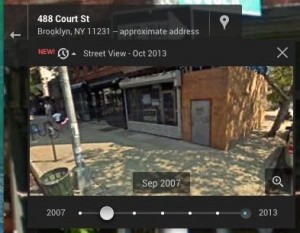
Just click and drag the slider to go time traveling in Street View.
- Go to any Street View-enhanced address in Google Maps, then look up at the translucent gray module the top-left corner of the page. Just below the street address, you should see a little clock labeled with a recent date, plus a red “New!” tag.
- Click the date and the module will expand, revealing a slider with a range of dates. Click one of the dates, and the inset window will display the Street View photo for that particular snippet of time.
- Now, go ahead and click the smaller Street View image to make it fill the screen, then use your mouse to look about and wander around—in the past.
The range of available dates will vary depending on the location, and don’t expect to find any Street View images pre-2006 or so.
For example, I was able to travel all the way back to 2007 on my block here in Brooklyn, with snapshots available for almost every year up to October 2013. But on my old street in Sacramento, California, only two dates were clickable: March 2008 and August 2011.
Even if the available dates are somewhat limited, it’s still pretty heady to jump back in time five years and watch, say, the building across the street morph from two stories to five, or witness how today’s trendy restaurant was once a boarded-up eyesore (see the larger image above).